The report is a render of the store, not a document you write. If a fact is not in the engagement, it cannot appear in the PDF.
Six formats, one model
pentest_report renders one model in six formats. Every format comes from one snapshot, so Markdown and PDF cannot disagree about a CVSS score.
| Format | Extension | What it is | Use it for |
|---|---|---|---|
md | .md | Portable Markdown with GFM tables and a format marker comment | Review, diff, ticket attachments |
html | .html | Self-contained page: inline CSS, contents rail, theme toggle, print action, embedded screenshots | Reading and printing to PDF by hand |
json | .json | The report model, schema 1.0.0 — every number the other formats print | Automation, evidence of what was reported |
pdf | .pdf | Print-ready A4 with an embedded TrueType font and page numbers | The client deliverable |
slides | .md | Markdown outline with slide separators and a dsh-redteam:format=slides marker | Turning the summary into a deck |
docx | .docx | Word document: cover, heading styles, real TOC field, PAGE/NUMPAGES footer, embedded PNG evidence | Client edits and sign-off |
HTML, DOCX and PDF are the only formats that carry images. DOCX embeds up to 24 PNG evidence images, sized to the A4 text column with alt text; HTML embeds the same gallery inline; Markdown, JSON and slides ignore images.
Draft versus final, and the completion gate
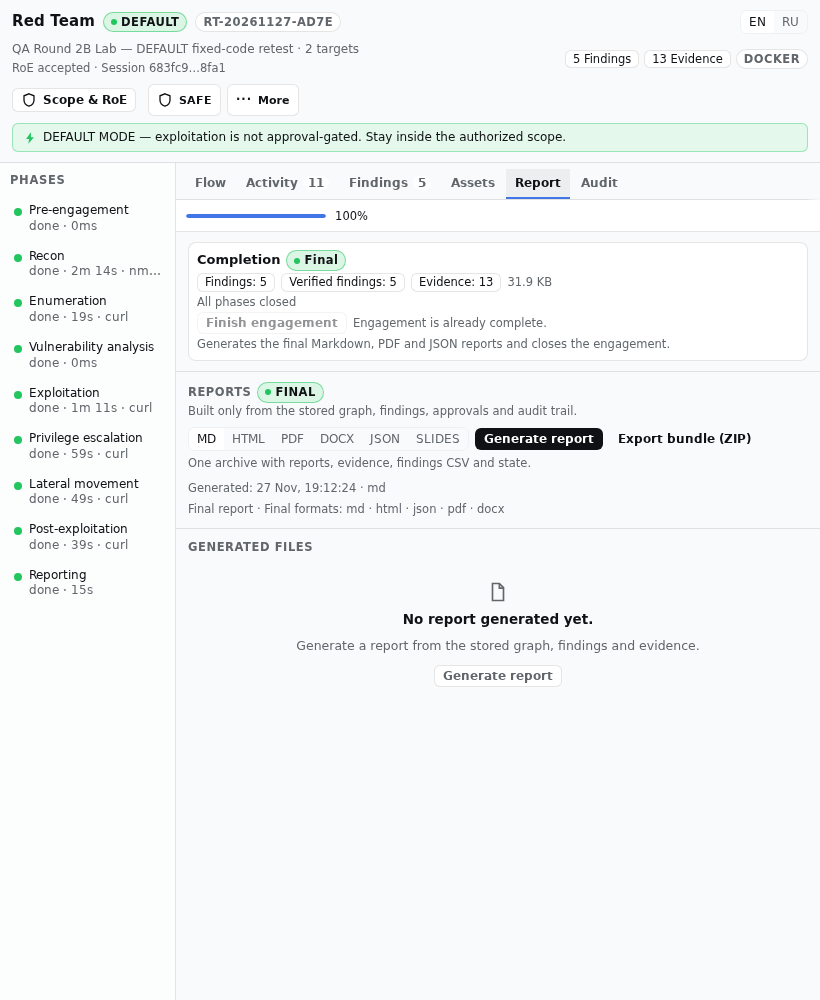
A report generated before the engagement is closed is a draft, and it is marked as one — the tool result says draft: true, the model carries the flag, and the panel labels the file. A draft is not the deliverable.
pentest_complete_engagement closes the engagement. It refuses while any non-reporting phase is neither done nor skipped; a blocked phase is never terminal, including a blocked reporting phase. It then marks reporting done (leaving a reasoned skip alone), sets the status to completed, persists coverage, audits engagement_completed, and generates the final set — md, pdf, json by default, or the formats you pass. If every format fails it restores the engagement to active and throws, rather than leaving you completed with no report.
{ "formats": ["md", "html", "pdf", "docx"],
  "lang": "en",
"note": "Final set after closure" }reports/ is create-exclusive: two generations produce two files, never one overwritten file.Reuse and force
Once an engagement is completed it owns its final report set. Asking pentest_report for a format that already exists returns the existing file with reused: true and the original path, instead of minting a second “final” report. To regenerate on purpose, pass force: true; the new file sits alongside the old and becomes the recorded final for that format. The same rule governs bundle export: a completed engagement reuses readable final files and generates only missing formats.
Writes are create-exclusive: generation never overwrites, and a collision adds a numeric suffix (-2, -3). That is why directories accumulate drafts, and why a hand-over names exact files.
The findings-first brief: verdict, issues, detail
The HTML report is no longer a KPI dashboard. It opens with the answer: a verdict panel in business terms, the severity mix, the three business issues that matter and what to fix first. Each business issue links straight to its finding card, so a reader can move from “what does this mean” to “what exactly was observed” without scrolling a wall of tiles. The risk index survives as a small supporting figure, never as the headline.
- Verdict and severity mix — the overall posture and the CVSS-derived bands, in text and colour.
- Business issues — three prioritized statements, each deep-linking to the finding that proves it.
- Findings as primary cards — severity, confidence, business impact and remediation visible; CVSS breakdown, CWE/OWASP/WSTG mappings, reproduction and references behind a per-finding expander.
- F-01-style display ids and absolute anchors — stable labels a client can quote, and in-report links that work from an exported copy.
- Supporting analysis collapsed — methodology, risk posture, compliance, the evidence register and the tool inventory sit behind native expanders on screen and open automatically for print.
Coverage is worded honestly: “Phases accounted for” reports executed and skipped-by-scope counts rather than implying that every phase was exercised. The JSON model carries the same metrics, including riskIndex, while Markdown, PDF and DOCX print them as tables and prose.
The risk index remains an additive triage aid, capped at 100, weighted 25 per critical, 15 per high, 8 per medium, 3 per low and 1 per informational. The sample's one critical, one high and one medium give 48/100; it is labelled as a triage aid, not a CVSS replacement. A weak-looking coverage number can be the honest one — three tested WSTG checks is 3%, and printing that is more credible than omitting it.
Document control and template fields
The cover and document-control block are driven by report.branding in the plugin configuration: companyName, preparedBy, reviewedBy, contact, website, reportVersion, classification, distribution, clientSignOff, authorizationDate, reportId and logo. Configured values replace the tokens; unconfigured ones print visible bracketed placeholders such as [PREPARED BY], so a field is never silently blank.
Passing templateFields: true adds a clearly marked TEMPLATE FIELDS page listing every token and a replacement hint. It is off by default, so a client report never contains instructions — but if you generate one with it on, delete that page before delivery. The document-control table itself is not a placeholder: it prints the real engagement id, classification, distribution and status.
In the published sample every branding token is still bracketed — [COMPANY NAME], [PREPARED BY], [CLASSIFICATION] — because the lab engagement configured none. A report with the right findings and the wrong cover still fails the hand-over.
The sections a client report actually has
The client section set is summary, scope, methodology, risk, findings, evidence, compliance and tools; narrative, simulation and audit are internal and need includeInternal. The order varies by format — the sample Markdown puts Findings before Compliance, the HTML the reverse. This is the Markdown order:
| # | Section | What it holds |
|---|---|---|
| 1 | Cover and Document control | Engagement id, client, date, status, mode, progress, classification, version, prepared/reviewed by, distribution |
| 2 | Executive Summary | Objective, risk in business terms, top three issues, what to fix first, coverage and limitations, sign-off |
| 3 | Scope & Authorization | RoE acceptance, client and contact, window, targets, CIDRs, domains, exclusions |
| 4 | Methodology | PTES phases with timestamps, coverage by phase, tested WSTG checks |
| 5 | Risk Posture | Severity bands, CVSS/NIST bands, coverage summary, remediation priority, average score |
| 6 | Findings | Register, then one card per finding: metadata, evidence, remediation, references, retest |
| 7 | Compliance Mapping | OWASP Top 10 families and the PCI DSS / ISO 27001 tags that were actually recorded |
| 8 | Evidence register | Every record grouped by kind, with SHA-256, linked findings and file name |
| 9 | Appendix — Tool inventory | Tools, run counts, non-zero exits, phases and first/last use |
| 10 | Authorization Disclaimer | Scope statement, confidentiality and the warning not to reuse the report as authorization |
English, Russian and the renderers
lang is independent of the UI language: en and ru both produce a complete report from the same state, and the sample set includes all five document formats in both. The PDF writer embeds DejaVuSans as a Type0 font with a ToUnicode map and full Cyrillic coverage; if the font is missing it fails loudly with the expected path and the advice to install fonts-dejavu-core. Set fontPath to another TrueType file if you need a brand font.
The PDF is a purpose-built writer, not a browser print: headings, paragraphs, lists, code, simple tables and page numbers are supported, complex HTML is flattened by design. The DOCX is A4 with real Word styles, a TOC field that Word populates on open, a PAGE/NUMPAGES footer and PNG evidence; both formats state that priorities and the risk index are recommendations, never client-agreed SLAs.
Where the files land
Reports go to $DSH_HOME/redteam/reports/<session>/ as <ENGAGEMENT>-<timestamp>.<ext>, mode 0600. The panel's Report tab lists generated files with format, size and time and offers a download per row; the completion card keeps the single final action. Nothing is emailed, uploaded or copied outside that directory — the bundle export is the only packaged route out.
Reviewing a report before you hand it over
Read the artefact, not the tool result: cover and document control (no bracketed tokens, correct client); summary figures against the dashboard; scope against what you actually touched; each finding's CVSS vector, CWE, OWASP and WSTG ids, and that its evidence id exists in the register; the register hashes against the vault; the limitations paragraph; the disclaimer. Then run pdftotext -layout over the PDF — a blank page is usually an empty store, not a broken writer.
Finally, check the file set matches the claim. “Reports delivered” means the exact paths in the completion result, not every draft in the directory.
Deep reference: documentation, report design, wiki, sample artefacts, resources.
What good looks like
- One final set generated by
pentest_complete_engagement, with the paths recorded and handed over explicitly. - Branding configured, or template fields deliberately stripped from the delivered copy.
- Brief numbers read before delivery; coverage wording and limitations explain the gaps.
forceused only when a regeneration is intended, never to “refresh” a final report by accident.- Both languages produced from the same state when the client asks for them — never hand-edited.