The install is short. The part worth slowing down for is the authorization step: until the operator accepts the Rules of Engagement, a gated phase will not start and the mode switch stays locked.
Requirements
Install on a machine you control, and only for work you have written permission to perform. The plugin is a DSH bundle: a Host half in Node and a Web client artifact. It declares no npm dependencies and needs no build step for the Host code.
| Component | Version or state | Needed for |
|---|---|---|
| DeepSeek Harness | 0.2.2-rc.3 or newer | Everything; this build is verified against that release |
| Node.js | 22 recommended, 20 minimum | The Host half and the tests |
| Docker Engine | Optional, reachable by the DSH process user | The Kali toolbox: container creation, install and remove |
| Chromium or Playwright browser | Optional, auto-discovered | Browser sessions and browser-driven web tests |
| DejaVu fonts | Optional | PDF reports with Latin and Cyrillic text |
Each optional component degrades in a stated way. On Node 20 the Host half, the toolbox and the report writer work, but browser automation needs the global WebSocket added in Node 21, so the Web test drawer reports itself unavailable. Without Docker the runtime badge reads HOST and pentest_exec uses binaries already on the DSH user's PATH; installation and removal remain impossible. Without Chromium, pentest_web_assess, API discovery, requests and fuzzing still run because they are fetch-based. Without a model route, AI wordlists and the AI scope draft report why they are unavailable, and every manual path still works.
Install in three commands
Install into the DSH profile that serves the Web UI you actually use. The examples use web; substitute your profile name.
git clone https://github.com/sm0k3net/dsh-redteam.git
cd dsh-redteam
dsh plugin --profile web add "$PWD"
Because the package declares dsh.bundle.patch, that last command links the checkout and selects the bundle. The profile records a local link and appends dsh-redteam to its bundle list. Nothing is copied: the files that load are the files in this directory, so moving or deleting the checkout breaks the plugin until you add it again from the new path.
For a release tarball, verify it first, then add the extracted directory that contains package.json, cordis.patch.yml and index.js:
sha256sum -c SHA256SUMS
tar -xzf dsh-redteam-v1.3.0.tar.gz
dsh plugin --profile web add "$PWD/dsh-redteam-v1.3.0"The install is a link, not a copy. If you keep engagements running while you reorganise directories, re-add the plugin from the new location and restart the Host before the next tool call. State under $DSH_HOME/redteam/ is unaffected by the move.
Docker access for the toolbox
The Tool Manager, pentest_setup_toolbox, pentest_install_tool, pentest_remove_tool and pentest_tool_search need a Docker daemon the DSH process can reach. On a single-user Linux install, the repository's helper grants access without a logout:
sudo ./scripts/enable-docker-access.sh "$USER"
docker info --format '{{.Server.Version}}'
The script creates the docker group if needed, adds you to it, installs acl when setfacl is absent, grants the running socket rw, and writes a systemd drop-in that re-applies the ACL when Docker recreates the socket. The ACL takes effect at once, so the running DSH process can use Docker; group membership only reaches new login sessions, which matters for terminals you open later.
If you cannot grant socket access, leave allowHostFallback at its default true. The panel labels the runtime HOST and the executor uses present binaries. Setting it to false makes pentest_exec fail with docker-unavailable instead. Neither mode ever runs apt on the host.
First launch and the panel
Reload the Web page, open the right sidebar, press + and choose Red Team. If the entry is missing after a reload, restart the server with dsh --profile web and reload again. The panel is per session: Settings and the Plugin Manager hide the sidebar, so no tab appears there.
- Reload so the module loader fetches the new
client.js. - Add the tab from the sidebar's + menu. The panel opens with its tabs and drawers.
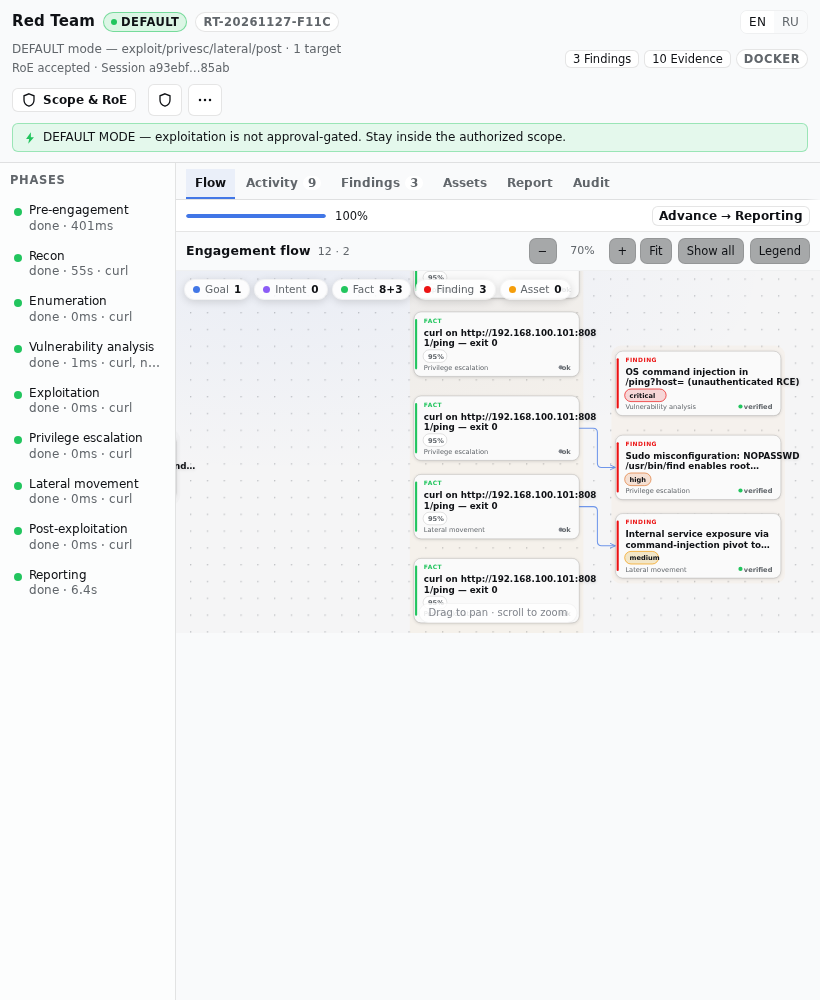
- Create an engagement from Scope & RoE, or let the agent start one; the panel opens itself once per session when an engagement becomes live.
The health check
The health route answers on the DSH Web server port. Run it on the DSH host itself: the bridge rejects an unauthenticated request from a remote peer, and a request carrying an Origin header must be same-origin.
curl -s http://127.0.0.1:3080/dsh-redteam/health
dsh --profile web --dump-config | grep -n "dsh-redteam"
The response carries ok, the plugin version and revision, the registered routes, and the effective defaultMode, containerName, image, allowHostFallback and phase ids. The composed-config row must exist and must not carry disabled: true; a profile patch that disables the row wins over the bundle and nothing activates.
| Check | Expected result |
|---|---|
| Tab registered | The + menu lists Red Team; the panel opens with its tabs. |
| Health route | ok: true with the version, revision and route list. |
| Composed row | A # == dsh-redteam layer and an - id: dsh-redteam row, not disabled. |
| Tool Manager | A DOCKER badge and an installed-over-total catalogue counter, or a labelled HOST fallback. |
| Agent tools | The agent can call pentest_state; the engagement starts from there. |
Before the first packet, confirm:
- the health route answers
ok: trueand the composed row is present; - the Red Team tab opens and the Tool Manager shows a runtime badge;
- scope fields match the written authorization, including exclusions;
- the Rules of Engagement are accepted, and the mode badge shows the mode you intend to run;
- the agent can read
pentest_stateand sees the same engagement.
Your first engagement
This build registers 51 pentest_* tools, a 47-entry Kali catalogue and 39 OSINT connectors, measured from the shipped code on 28 November 2026. The suite reports 714 cases: 712 passing and 2 environment-dependent skips. You do not need any of them for the first three steps.
- Describe the authorization. In Scope & RoE, enter the targets, CIDRs, domains and exclusions exactly as the written permission states them. Add the client, contact and work window.
- Accept the Rules of Engagement. Tick the confirmation and press Accept and start. This is operator-only: the agent has no tool that can do it. Acceptance unlocks gated phases and the mode switch, and is written to the audit trail.
- Start the work. Ask the agent for a scoped first phase. It calls
pentest_start_engagementwithname,clientand the scope, seeds the nine phases, and begins withpentest_set_phase.
Start a DEFAULT-mode engagement named "Acme storefront" for acme.example,
scope includes that host only. Run recon, record what you find as facts
and assets, and stop before exploitation.
The panel opens itself once per page load when the engagement becomes live. From then on, the Flow tab is the record: a fact you cannot point to in the graph will not appear in the report.
Next: understand the panel before you run anything, or go deeper with the install reference, the safety model and the tool reference.
What good looks like
- Three commands link the checkout and select the bundle; the install is a link, so do not move the directory afterwards.
- Docker is optional. Without it the runtime degrades to host tools and installation is refused, not silently attempted on the host.
- The health route, the composed row and the Tool Manager badge diagnose almost every failed first launch.
- The operator accepts the Rules of Engagement; the agent cannot. Acceptance is what unlocks gated phases and the mode switch.
- A first engagement is scope, acceptance, then one phase — not a scan of everything the tool can reach.