Scope is the authorization boundary, and the plugin treats it that way: it is checked in code at the moment of action, not written into a prompt and hoped for. Get the fields right once and every later refusal makes sense.
Scope fields and matching
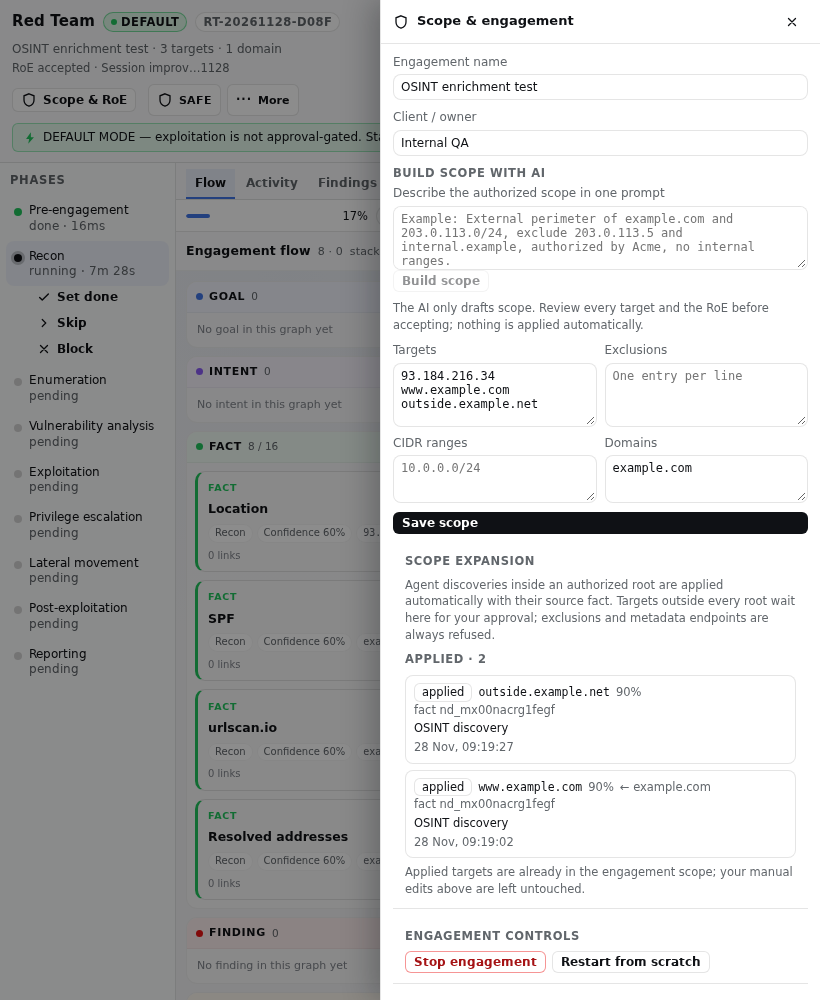
The scope object has four lists. All are optional individually, but at least one of targets, CIDRs or domains is required to start an engagement.
| Field | Accepts | Matching rule |
|---|---|---|
| Targets | Hosts, host:port, or full http(s) URLs | Exact host; when a port is present it must match; a URL is compared by host and port |
| CIDRs | IPv4 ranges such as 10.0.0.0/24 | Address containment inside the range; IPv6 CIDRs are not supported |
| Domains | Bare suffixes such as example.com | Apex and every subdomain match; a leading dot is ignored |
| Exclusions | Any of the forms above | Exclusions win over every positive entry, including partial CIDR overlap |
Five rules decide the edge cases. An empty scope means no active testing, not "everything allowed". The four cloud metadata addresses (169.254.169.254, 100.100.100.200, metadata.google.internal, metadata.google.com) are refused even if someone puts them in scope. Only http: and https: reach the browser and HTTP client; file:, data:, javascript:, chrome:, devtools: and view-source: are refused. When the runtime is Docker, a tool target of localhost, 127.0.0.0/8 or ::1 is refused before execution, because inside the container it would address the container rather than the Host. And exclusions are not a hint: a range that merely touches an excluded range is out.
Scope can be supplied when the engagement is created — pentest_start_engagement takes targets, cidrs, domains and exclusions — but after that, replacing it is operator-only. An agent call to pentest_scope without target is refused by design, and the rejection is audited. A scope save replaces the whole object rather than merging, so review all four fields before you press save. The one agent path that can change the boundary is a discovery expansion, described next.
The Rules of Engagement
Acceptance records the client, an emergency contact, the start and end dates, free-text constraints, a timestamp and an actor. It is per engagement, never inherited, and it is the switch that unlocks gated phases and the mode control. Three actions exist only in the operator bridge — accepting the RoE, switching the mode and resolving an approval — and the engine refuses them for any other actor. The agent's tool set contains no equivalent call.
Acceptance survives a scope change. That is intentional: adding a host to an authorized engagement should not force you to re-attest the whole relationship, but it does mean the audit trail, not the acceptance timestamp, is where you prove what was in scope at any moment. Every scope save, acceptance and mode change is appended with actor and time.
Accepting the RoE attests that you are authorized to test the listed scope. The plugin records the attestation and enforces the lists; it cannot verify that your permission is real. If the written authorization and the drawer disagree, fix the drawer before the first packet.
Scope expansion after a discovery
Recon and OSINT routinely find a host nobody listed. Stopping the engagement for a drawer edit is safe but wasteful, so 1.3 adds a constrained expansion path: the agent calls pentest_scope with target plus the discovering factId or evidenceId, a short source, a reason and an optional confidence (default 0.6). Supplying scope arrays in the same call is refused — an expansion is not a replacement.
| Situation | Decision | What you see |
|---|---|---|
| Inside an authorized target, CIDR or domain root | applied automatically; the new entry is audited with its source | A scope change plus scope_expanded in the audit trail |
| Outside every root | pending proposal, not authorized | A row in Scope proposals with target, root matched or missed, source, confidence, reason and time, plus a scope_proposal_created audit entry |
| Exclusion or cloud-metadata endpoint | Refused before any proposal | scope_expansion_rejected with the reason |
| Already in scope or already proposed | duplicate, no change | An unchanged result naming the existing status |
The operator resolves a pending proposal with Approve or Reject in the Scope & RoE drawer. An approval adds the target; a rejection records the decision and leaves the boundary alone. The Rules of Engagement acceptance is never reset by an expansion, because it is still the same authorized relationship — the audit trail, not the acceptance timestamp, is where you prove what was in scope at any moment.
This is deliberately narrower than “the agent can edit scope”. It cannot replace the lists, it cannot override an exclusion, and it cannot authorize itself outside a root. The planner lives in lib/host/scope.js (classifyScopeTarget, planScopeExpansion, resolveScopeProposal, reconcileScopeExpansion), so the decision is deterministic and testable.
The AI scope draft
Build scope with AI turns one plain-language description into a draft: name, client, summary, targets, CIDRs, domains, exclusions, assumptions and a confidence score. It reuses the Host model route, or the explicit scopeAI.provider and scopeAI.model when set. If no route is configured, the action is unavailable and the fields remain manual.
The privacy boundary is narrow and worth stating precisely: the only text sent to the model is the description you typed plus a static instruction. No engagement document, target list, graph node or credential is attached. The reply is treated as untrusted data and re-validated locally. Metadata endpoints and CIDRs covering them are removed, URLs are reduced to their origin, hostnames and CIDRs are parsed and deduplicated, lists are capped at 200 entries, assumptions at 30, and credential-looking strings are redacted before anything is shown back to you.
A draft is plain data. It fills the fields for review; nothing is saved or applied until you press Save scope, and the audit records the draft event rather than a scope change. The save is the change. No consent checkbox is needed for the prompt because it is your own text; scopeAI.allowRemoteContext is reported for parity with the wordlist feature, but a draft never attaches engagement data either way.
DEFAULT versus SAFE
The install default is defaultMode: default. DEFAULT runs the full PTES chain inside the accepted scope. SAFE is opt-in and holds exploitation-class categories for an operator decision. A new engagement inherits the configured default; a stored engagement keeps its own mode, and every switch is audited with actor and timestamp.
| Behaviour | DEFAULT (install default) | SAFE (opt-in) |
|---|---|---|
| Recon, enumeration, vulnerability analysis | Runs directly | Runs directly |
| Exploitation, privesc, lateral, exfiltration, credential, credential_dump | Runs directly | Blocks on an approval card; denial returns as a result |
| Scope checks, exclusions, metadata blocking | Always on | Always on |
| Append-only audit and evidence hashing | Always on | Always on |
| Who can switch the mode | Operator only, after RoE acceptance | Operator only, after RoE acceptance |
To keep the approval gate for every new engagement on an installation, set the mode in the profile row and reload the plugin:
- insert:
    - id: dsh-redteam
      name: dsh-redteam
      config:
        defaultMode: safe
        approvalTimeoutMs: 600000
Switching to DEFAULT does not disable scope enforcement, the audit trail or the authorization disclaimer every report carries. It only removes the approval step for gated categories.
Which mode for which engagement
| Engagement | Mode | Why |
|---|---|---|
| Client web or API assessment with no exploitation agreed | SAFE | Every intrusive step already needs a conversation; the gate makes the conversation explicit. |
| Internal Active Directory test with credentials and lateral scope | SAFE | Credential, lateral and privesc categories are exactly what the gate holds; approve per phase, not blanket. |
| Lab or CTF range you own, no third parties | DEFAULT | No approval bottleneck, and scope plus audit still bound the work. |
| Red-team exercise where speed is part of the test | DEFAULT | Approval latency would distort the exercise; the written RoE still governs. |
| Compliance-driven test with a fixed, non-destructive checklist | SAFE | Prevents an unplanned exploitation step from widening the engagement. |
Both modes enforce scope, audit, evidence and operator-only authority. SAFE adds a human decision before intrusive categories; it does not make an unauthorized target acceptable, and DEFAULT does not remove the authorization requirement. Choose based on how much interruption the engagement can tolerate, not on whether you trust the agent.
Next: running the engagement — phases, execution, approvals and closure. Deeper: SAFETY.md, CONFIGURATION.md and the tool reference.
What good looks like
- Scope has four lists; exclusions win, metadata hosts are always blocked, and an empty scope means no active testing.
- The agent may supply scope when it creates the engagement, but later scope edits are operator-only and a save replaces the whole object.
- RoE acceptance is an operator attestation that unlocks gated phases and the mode switch; it survives scope edits but is always audited.
- The AI scope draft sends only your typed description, validates the reply locally, and changes nothing until you press Save scope.
- DEFAULT is the install default; SAFE only adds approvals for intrusive categories. Both modes enforce scope, audit and evidence.