What it is, and what it is not
dsh-redteam is a DeepSeek Harness bundle that turns the sidebar into a penetration-testing workbench. It has two halves that share one store: a Host plugin that registers 51 pentest_* tools, a PTES phase engine, a Kali executor, an evidence vault and a report writer; and a browser client that registers a native right-sidebar panel with eight tabs and eight drawers. The agent works the engagement; the operator watches, authorises and intervenes.
The shape is deliberately conventional: nine PTES-derived phases, a Goal → Intent → Fact → Finding → Asset graph, scope with exclusions, and artifacts generated from the store rather than from model memory. The bundle is MIT licensed, has no npm dependencies, and runs unchanged on a checkout; the documented suite is 714 node:test cases: 712 passing and 2 environment-dependent skips (the opt-in Docker check, which creates and removes a real container, and the browser demo whose external target is unreachable from this host).
It is equally important to say what it is not. It is not a scanner: no discovery engine decides what to attack; it runs the tools you authorise, through a scope check, and records what happened. It is not a hosted service: state lives under $DSH_HOME/redteam/, and the panel talks to the local Host over same-origin HTTP and SSE. It is not self-propagating: no worm, no persistence outside the DSH profile, no exfiltration path. And it is not an authorisation authority: it records the Rules of Engagement and enforces the scope you enter, but it cannot verify that you were permitted to test the target.
Install and first run
Requirements are modest:
| Component | Requirement | Needed for |
|---|---|---|
| DeepSeek Harness | 0.2.2-rc.3 or newer | Everything; the plugin is verified against that release |
| Node.js | 22 recommended, 20 minimum | Host half and tests; DSH itself declares Node >= 24.9.0 |
| Docker Engine | Optional but recommended | The Kali toolbox; without it the plugin runs tools already on PATH in a labelled degraded mode |
| Chromium or Playwright | Optional, auto-discovered | Browser sessions and browser-driven web tests |
| DejaVu fonts | Optional | PDF reports with Latin and Cyrillic text |
Install into the profile that serves your Web UI. The three commands are the whole procedure:
git clone https://github.com/sm0k3net/dsh-redteam.git
cd dsh-redteam
dsh plugin --profile web add "$PWD"
Because the package declares dsh.bundle.patch, DSH selects the bundle as well as linking it: the profile records a link to the checkout and appends the bundle to its activation order. This is a link, not a copy — moving or deleting the directory breaks the plugin until you re-add it. Then reload the page, open the right sidebar, press + and choose Red Team. If the entry does not appear, restart the server with dsh --profile web and reload.
Two verification calls. The health route reports liveness, version, routes and the effective mode:
curl -s http://127.0.0.1:3080/dsh-redteam/health
dsh --profile web --dump-config | grep dsh-redteam
If your user cannot reach the Docker socket, the repository ships a Linux helper that grants access without adding you to the docker group: sudo ./scripts/enable-docker-access.sh "$USER". Otherwise point the plugin at a daemon you can already reach.
First run is an authorisation step, not a scan. Open Scope & RoE, enter the targets, CIDRs, domains and exclusions from the written permission, fill in client, contact and dates, read the statement and tick the confirmation. Accept and start records the acceptance in the audit trail and unlocks gated phases and the mode switch. The agent cannot do this for you: acceptRoe is an operator-only action in the bridge, and there is no tool that exposes it.
DEFAULT is the install default and runs the full PTES chain inside the accepted scope. SAFE is opt-in — set defaultMode: safe when an installation needs the approval gate — and it holds exploitation-class categories for an operator decision. Scope enforcement, operator-only RoE acceptance, the append-only audit and evidence hashing apply in both modes.
With the RoE accepted, start the engagement from the panel or by asking the agent:
Start a DEFAULT-mode engagement named "Acme storefront" for acme.example,
scope includes that host only. Run recon first, record facts and assets,
and stop before exploitation.
The agent's first call is pentest_start_engagement with name, targets and client; it seeds the nine phases and writes an audit entry. The panel opens itself once per session when an engagement begins.
The surfaces you will actually use
The panel has eight tabs and eight drawers, and the split matters: tabs are for reading the engagement, drawers for changing it.
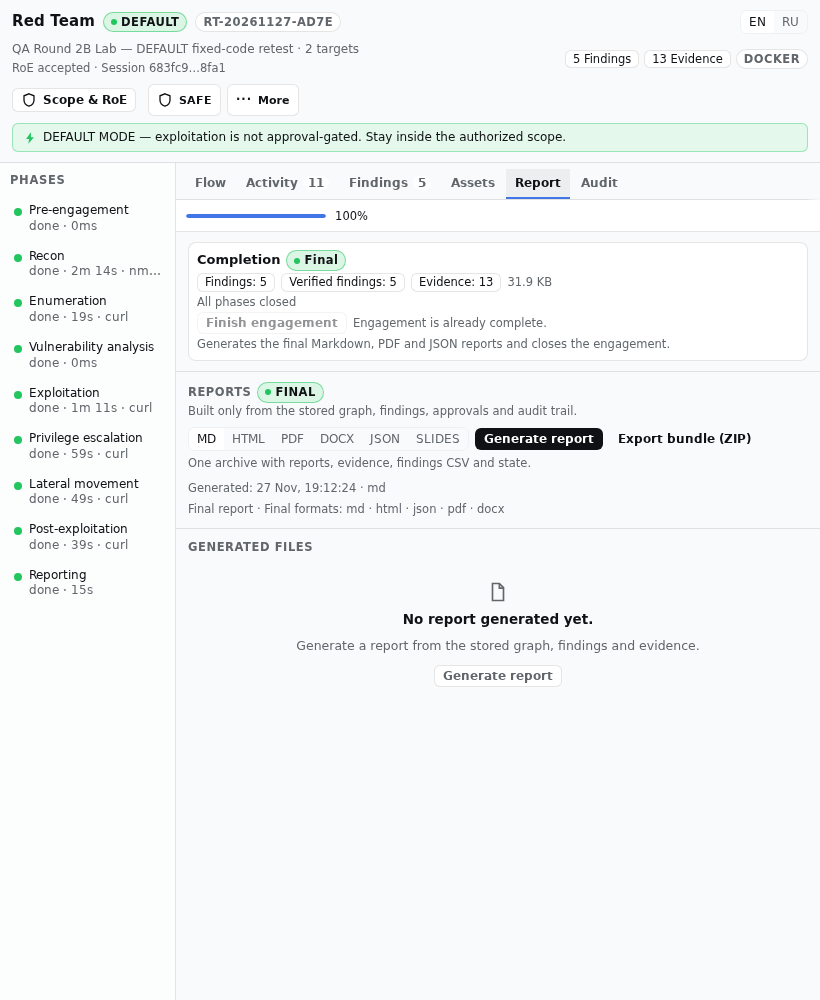
Flow is the graph — goals, intents, facts, findings and assets, with labelled spawns, yields, derived_from, proves and parent edges. Selecting a node opens the tool run behind it: command, exit code, output excerpt and linked evidence. Activity lists every invocation with target, category, runtime, worker, duration and a kill control, including blocked and denied runs — that is how you see a gate working. Findings is a sortable table with CVSS, CWE, OWASP, WSTG and status, and promotes a finding into the report. Assets holds hosts, URLs, services, accounts and cloud resources. OSINT is the 1.3 addition: a read-only board of IP/CIDR/domain/hostname results with identity fields, reputation, sources, confidence and the graph nodes they connect to. Report generates and downloads deliverables. Team is the 1.2 addition: the plan, the role tasks with their dependencies and budgets, the critic verdict and the delegation prompt for each task. Audit shows the bounded tail of the append-only trail.
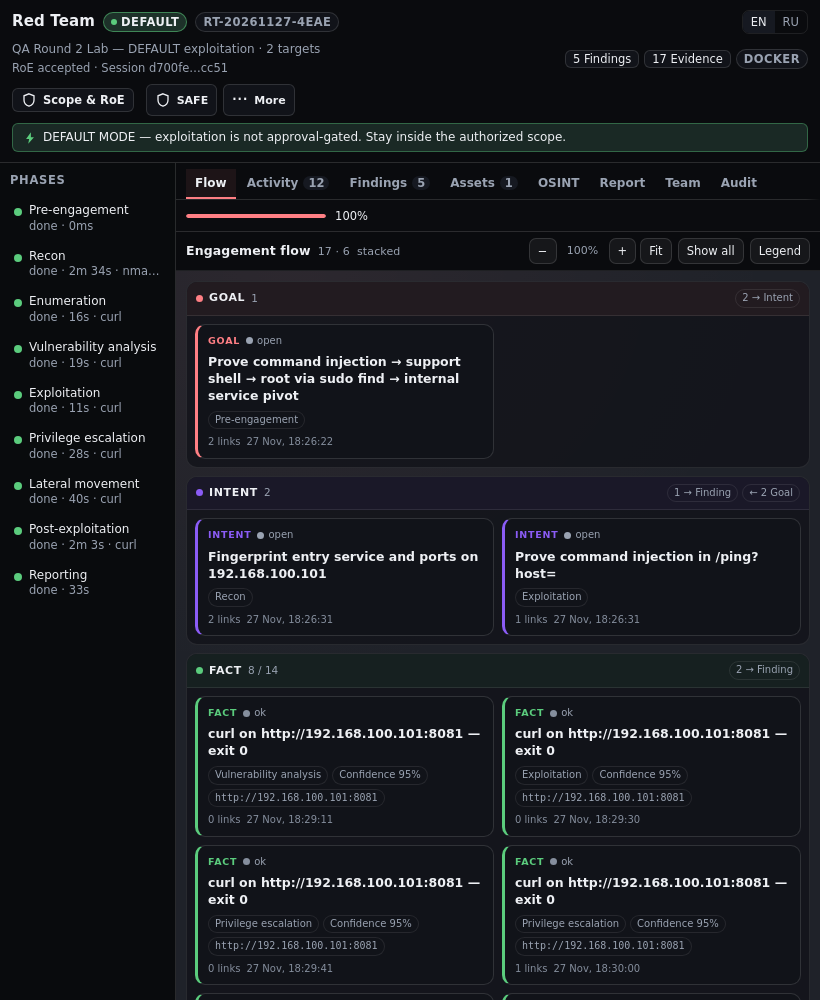
The drawers are the operator's controls: Scope & RoE (targets, CIDRs, domains, exclusions, acceptance, and an AI scope draft you review field by field), Tool manager (the curated Kali catalogue, install and remove), Wordlists (12 bundled lists plus uploads and AI-generated lists), OSINT (39 connectors and their key state), Web test (browser sessions and HTTP assessment results), API test (discovery inventory and fuzzing), Evidence (hash-stamped captures and the ZIP package) and Approvals (pending decisions). The Assets tab adds a target-topology view of hosts, services, findings and the edges between them.
The 1.1 release widened the hand-off surface without changing that shape. pentest_report writes DOCX as well as Markdown, HTML, JSON, PDF and slides; HTML and DOCX embed the evidence screenshots with their ids, targets and SHA-256 values. pentest_export_bundle packages every report, the vault, findings CSV/JSON, state, audit trail and tool runs into one deterministic ZIP with a manifest and checksums. pentest_nuclei runs scoped, rate-limited template scans; pentest_skills exposes 20 auditable playbooks; and the Report tab was rebuilt around a risk dashboard, coverage and a retest register.
The 1.2 release adds the parts that decide whether a finding survives review. pentest_plan keeps a budgeted step plan (tools, tokens, minutes, parallelism) and runs a deterministic critic that blocks on hard conditions only — an exploited finding with no evidence, a hard budget overrun, an unsafe risk flag — and reports an overrun instead of clamping it. pentest_team turns selected roles into per-phase tasks with dependencies and write scopes, produces the delegation prompt for each, and optionally publishes native Agent Teams tasks; both surface in the new Team tab. pentest_identity records accounts, auth method and privileges, builds the account × asset access matrix, lists coverage and privilege gaps and records identity tests — secrets are never stored, only whitelisted fields with credential-shaped text redacted. pentest_oob mints unguessable canary tokens for blind SSRF and XXE callbacks and records bounded, deduplicated hits, but it opens no listener and sends no traffic; a target attached to a canary must be inside the accepted scope. pentest_verify is evidence-only: it reads what the engagement already captured and returns confirmed, refuted or inconclusive against a CWE rule, and the same input always produces the same verdict. pentest_retest turns a stored HTTP proof into a replay plan — GET, HEAD or POST only, destructive paths refused — and only replays after you review it, then closes the finding as fixed, still vulnerable or inconclusive. pentest_sarif writes SARIF 2.1.0 with CWE, OWASP and WSTG ids, CVSS and a stable fingerprint for triage tools, and the report bundle carries the same log as findings/findings.sarif.
The 1.3 release turns the OSINT layer into an evidence pipeline and gives the engagement a lifecycle. pentest_osint_enrich builds a passive, sourced intelligence model for one in-scope IP, CIDR, domain or hostname — ASN, geography, PTR, hostnames, certificate subdomains, third-party ports, reputation, provenance and confidence — without scanning or connecting to the target. pentest_osint_report writes a standalone Markdown, HTML or JSON brief from stored facts, and the new OSINT tab renders only what was actually collected. pentest_scope can now expand the boundary from a discovery: automatic inside an authorized root, a pending operator proposal everywhere else. pentest_exploitation runs a bounded, evidenced exploitation loop with hard caps, Stop and Restart from scratch manage the engagement lifecycle without deleting the record, and the HTML report is rebuilt as a findings-first brief.
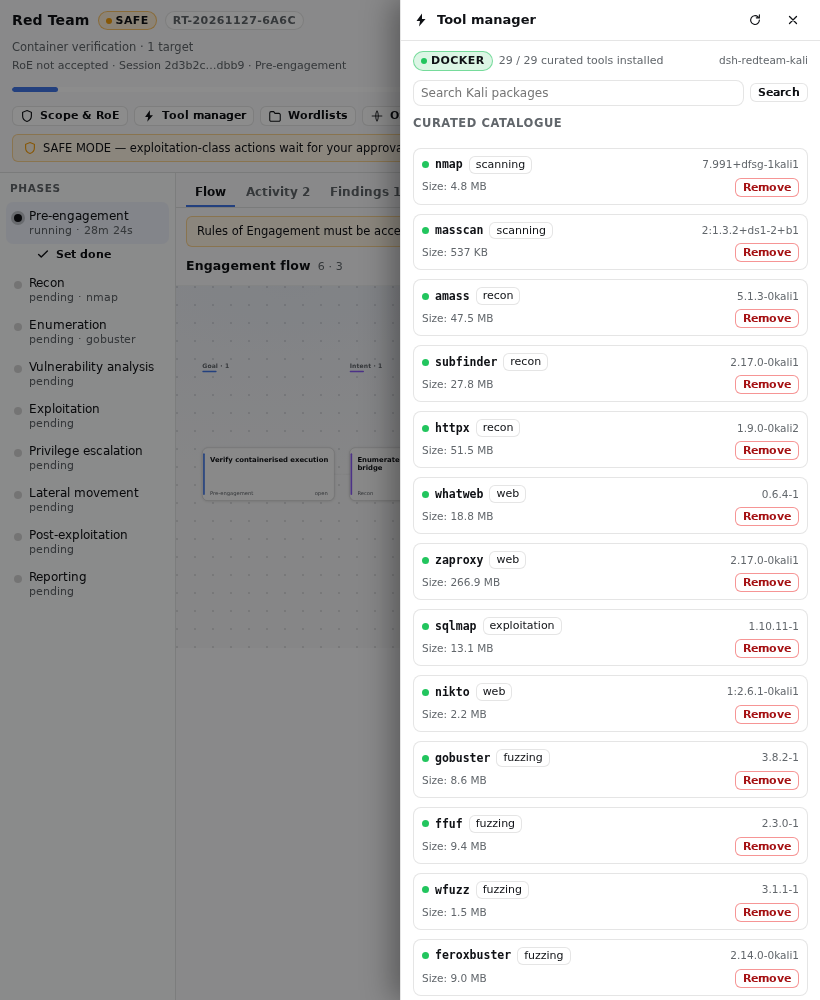
dsh-redteam-kali container, never on the host.State is per session: the engagement, graph, runs, approvals, audit and evidence are keyed by the DSH session id, so two sessions get two independent engagements. Appearance follows the Host theme tokens, and English and Russian are built in for the panel and the reports.
A worked engagement
A small web assessment exercises every surface without a lab.
Scope. One host, one URL, no CIDRs, exclusions for the payment path. Accept the RoE. The audit trail now has the acceptance, and gated phases are open.
Recon. pentest_set_phase with phase: "recon", then pentest_exec with an argv array — nmap, -sV, -Pn, the host. The plugin resolves the target against scope before the process starts, streams output into Activity, auto-captures the run as evidence, and caps the recorded output. The agent records what it actually saw as a fact (pentest_add_fact) and each host or service as an asset (pentest_add_asset), with the tool run attached.
Enumeration. pentest_resolve_wordlist returns the path the active runtime can actually read, then a pentest_exec of gobuster or ffuf with a small list. A discovered path becomes a fact; a path with an exposed directory listing becomes a finding with a CVSS vector, CWE and WSTG reference.
Web checks. pentest_web_assess does the cheap checks: security headers, cookie flags, form and CSRF heuristics, technology hints, and bounded same-origin probes for /.git/HEAD, /.env and /server-status. Each result carries its evidence, and the whole pass is one audited tool call.
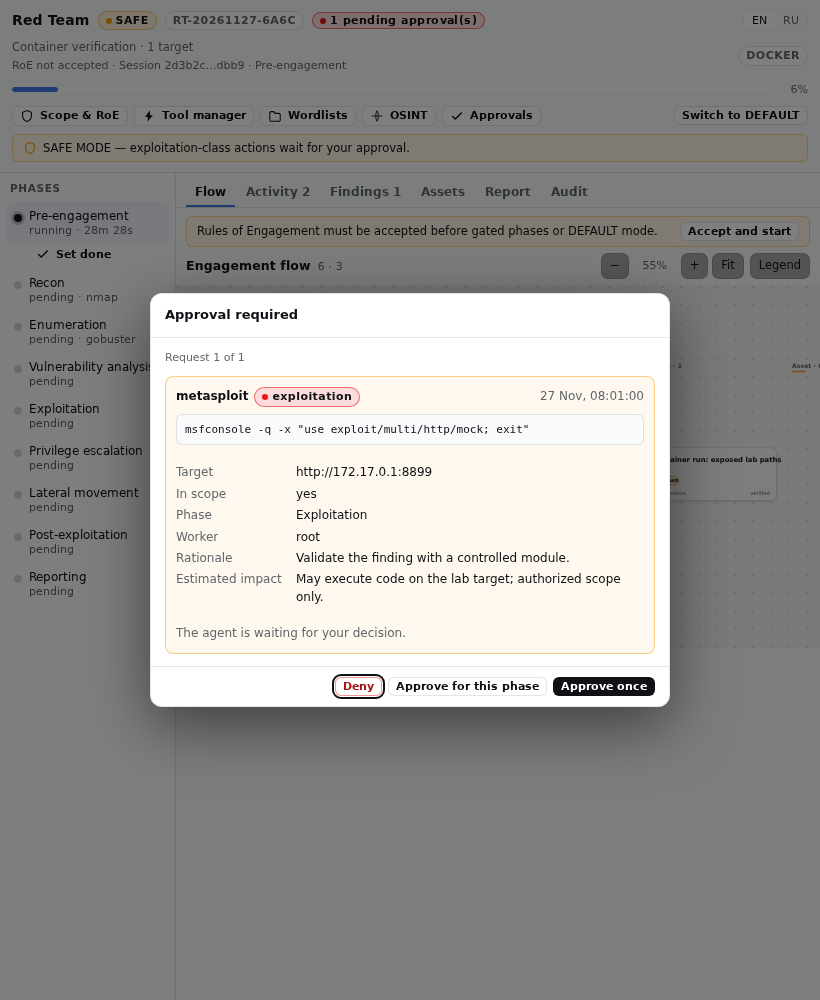
The gate. Now the agent proposes something irreversible — validating a finding with a Metasploit module, for example. In optional SAFE mode the call does not run. It produces an approval card containing the exact command, the target, the scope result, the phase, the worker, the rationale and the expected impact, with three decisions: Deny, Approve for this phase and Approve once. If nobody answers within the configured timeout (five minutes by default), the request expires and the tool call returns a denial. The agent is told not to retry in a loop; it has no tool that can resolve the card.
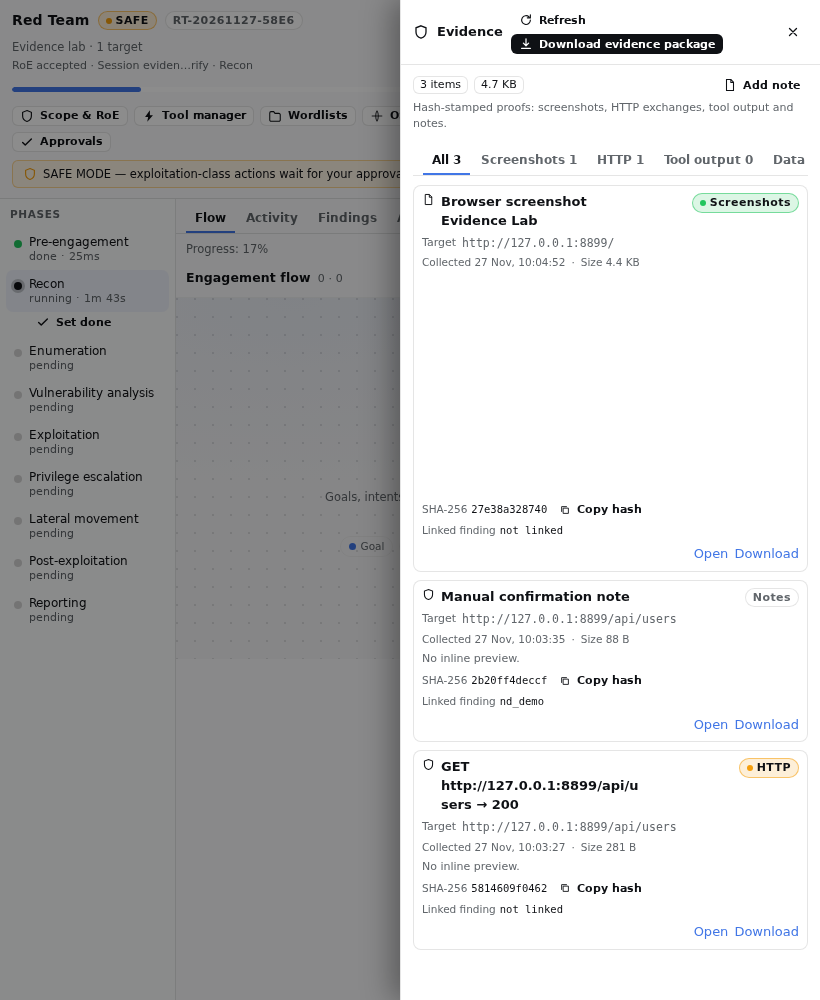
Evidence. Screenshots, HTTP exchanges, tool output and notes land in the evidence vault. Each record is written once under the session's directory with a SHA-256 over the stored bytes, a per-record meta.json and an append-only manifest. The drawer shows the hash, the target, the kind and the linked finding; the package button builds a ZIP with manifest.json, a README carrying the authorisation disclaimer, and sha256sums.txt.
Report. Every non-reporting phase must be done or skipped with a reason before completion. Then pentest_complete_engagement generates the final set in the requested formats: Markdown, self-contained HTML, JSON, PDF, DOCX and a Markdown slide outline. English and Russian templates are available independently of the UI language, and every report includes the scope and authorisation, the methodology, findings with mappings, an evidence register and an audit appendix. A report produced before closure is marked as a draft — useful, but not a deliverable. pentest_export_bundle then writes the whole project — every report format, the vault, findings, state and audit — as one deterministic ZIP.
Three shapes, and the guardrails that matter
The plugin adapts to the engagement rather than the reverse. Three common shapes:
| Shape | Typical scope | What the agent carries | Where the operator decides |
|---|---|---|---|
| Small web application | One host or URL, a handful of paths | Web assessment, browser flows, API discovery, findings, evidence | Any exploitation or credential attempt; report sign-off |
| Internal Active Directory | CIDR ranges and named domains | Enumeration with crackmapexec, impacket and enumeration tooling; asset and identity graph | Credential, lateral and privesc categories — per-phase approval, not blanket |
| OSINT and attack-surface review | Domains only, no active packets | pentest_osint and pentest_osint_enrich across 39 connectors, fact nodes, an exposure memo and a standalone OSINT report | Which lookups run and with whose keys; leak approval and dark-web gates; what goes into the client-facing text |
A warning for the internal shape: the catalogue includes credential and lateral-movement tooling because authorised internal testing uses it, and those are exactly the categories SAFE mode gates. Approve for a phase only when the phase, accounts and ranges are all inside the written scope.
Finally, the guardrails — the behaviours to expect when something goes wrong, all of which are deliberate:
- Out-of-scope targets are refused before approval. The scope check runs first, so an operator is never asked to approve a target outside the engagement. Refusals are audited as
scope_denied. - Approvals expire. An unanswered request returns a denial after the timeout; a cancelled or aborted call expires rather than granting.
- Skipped phases need a reason. Completion refuses while a non-reporting phase is neither done nor skipped with a note — a skipped phase is a documented limitation, not a silent gap.
- Evidence is immutable. Nothing overwrites an existing record, and the hash is over the stored bytes.
- Reports are drafts until completion. The final set is produced by the completion call, not by generating a report early.
- Missing Docker degrades, it does not block. Recon still works with host tools; install and remove are disabled until a daemon is reachable.
Read the usage guidelines for the step-by-step path, the install guide before the first engagement and the safety model before the first approval. For the control pattern this plugin implements, see the use-case article; for the runtime underneath, start with what DeepSeek Harness is.
Key takeaways
- dsh-redteam is an MIT-licensed DSH bundle: 51 agent tools and a native sidebar panel over one engagement store, with no npm dependencies.
- Install is three commands into the profile that serves your Web UI; verify with the health route and
--dump-configbefore opening the panel. - The operator accepts the RoE, switches the mode and resolves approvals; none of those actions exists in the agent's tool set.
- DEFAULT is the install default; in optional SAFE mode, exploitation, privesc, lateral, exfiltration and credential categories block on approve-once, approve-for-phase or deny, with a five-minute default expiry.
- Out-of-scope targets are refused before approval, evidence is write-once and hashed, skipped phases need a reason, and reports stay drafts until completion.
- 1.2 adds plan and team mode, an identity and access matrix, inert OOB canaries, evidence-only verifiers, a scoped retest lifecycle and SARIF 2.1.0 export — all tied to the engagement, and none of them bypasses the mode switch or the approval gate.
- 1.3 adds passive OSINT enrichment with a standalone report and an OSINT tab, safe scope expansion from a discovery, a bounded exploitation loop, stop/restart lifecycle management and a findings-first HTML brief.
Sources
- dsh-redteam repository — features, requirements and install
- Install, upgrade and remove — dsh-redteam docs
- User guide — tabs, drawers and workflows — dsh-redteam docs
- Safety model — modes, approvals, scope, audit and evidence — dsh-redteam docs
- Architecture — Host/Client split, data model and security invariants
- Agent tools reference — all 51 tools with parameters and gates
- DeepSeek Harness approval subsystem — the seam the panel builds on
- DeepSeek Harness architecture — profiles, bundles and composition
- dsh-redteam wiki — task-oriented guides and recipes

dsh-redteam brings PTES engagements, scope and approval gates, an evidence vault and reports into the DeepSeek Harness sidebar. MIT licensed.
Download v1.3.0 Explore the plugin